Wednesday, July 23, 2025

Two ways to Unstage a File in Git git rm --cached and git reset Head)

Git Unstage file

Common question on git unstage :

This post covers the following questions with in-depth answers along with step-by-step example.
git reset - Why are there 2 ways to unstage a file in git? - Stack Overflow
version control - How to undo 'git add' before commit? - Stack Overflow
git - How can I unstage my files again after making a local commit.

More article on Git Series


Unstage a File in Git:

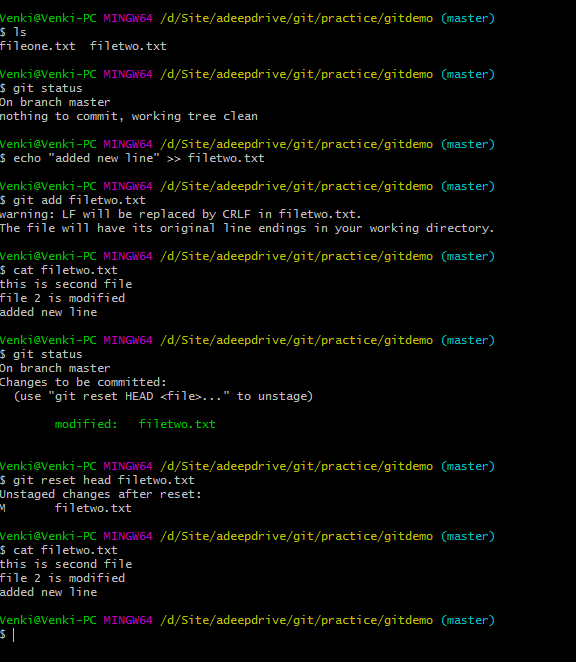
In Git, unstaging a file can be done in two ways.

1) git rm --cached <file-name>
2) git reset Head <file-name>

These commands are very useful when we add the files to git. But later or before commit, we realize that mistakenly added the files to git. we should remove the files from git. The process of removing a file from  staging area is called "Unstaging file" from git.

We will be discussing indepth in this tutorial.

Unstage a File in Git

Way 1) git rm --cached <file-name>:

This can be used in two ways.

1) On the brand new file which is not on github.
2) On existing file which exists on github.

We will see how this command behaves on above 2 scenarios.

Case 1: rm --cached on new file which is not committed.

rm --cached <brand-new-file-name>is useful when we want to remove only the file(s) from staging area where this file is not available on github ever. After executing this command, the file remains in the local machine, it just unstaged from staging area.

Example:

The below example is on the new file.

Venki@Venki-PC MINGW64 /d/Site/adeepdrive/git/practice/gitdemo (master)
$ ls 
fileone.txt

Venki@Venki-PC MINGW64 /d/Site/adeepdrive/git/practice/gitdemo (master)
$ echo "this is second file" >> filetwo.txt
Venki@Venki-PC MINGW64 /d/Site/adeepdrive/git/practice/gitdemo (master)
$ ls
fileone.txt  filetwo.txt

Venki@Venki-PC MINGW64 /d/Site/adeepdrive/git/practice/gitdemo (master)
$ git add filetwo.txt

Venki@Venki-PC MINGW64 /d/Site/adeepdrive/git/practice/gitdemo (master)
$ git status
On branch master
Changes to be committed:
  (use "git reset HEAD <file>..." to unstage)
        new file:   filetwo.txt

Venki@Venki-PC MINGW64 /d/Site/adeepdrive/git/practice/gitdemo (master)

$ git rm --cached filetwo.txt
rm 'filetwo.txt'Venki@Venki-PC MINGW64 /d/Site/adeepdrive/git/practice/gitdemo (master)
$ git status
On branch master
Untracked files:
  (use "git add <file>..." to include in what will be committed)
        filetwo.txt
nothing added to commit but untracked files present (use "git add" to track)

Java 21 Virtual Threads Basic and Foundation

Introduction

Hey everyone 👋,

Welcome to the first post in our deep dive series on Java Virtual Threads! Before we jump into the nuts and bolts of virtual threads, it’s important to lay the foundation. Yes, the first couple of sections may feel basic—but they are essential to understand how things work under the hood, especially when we eventually zoom in on virtual threads.

So bear with me. This foundational knowledge will help you fully grasp the power and potential of virtual threads.

🚀 Starting Simple: Running a Java Program

Let’s imagine you’ve developed a simple Java application and packaged it into a JAR file.

 java -jar myapp.jar


When you run this command, your program is loaded into memory and a process is created.

Sunday, July 20, 2025

Java 8 - How to convert Calendar to LocalDateTime?

1. Overview

In this article, You'll learn how to convert Calendar to LocalDateTime object in java 8 DateTime api

LocalDateTime api can be used completely replacement to the Date class as all features of Date functions are done in a simple and precise way such as adding minutes to the current date.

Java 8 - How to convert Calendar to LocalDateTime?

Ultimate Guide to Java Virtual Threads: Build Scalable Applications with Ease

Are Java Virtual Threads the Future of Concurrency? Absolutely. Here's Why You Should Care.

If you're a Java developer, you already know: every line of code runs on a thread. Threads are the fundamental unit of scheduling and concurrency in any Java application.

Traditionally, developers have relied on multiple OS-level threads to handle concurrent tasks. For example, Spring Boot with embedded Tomcat comes configured with 200 threads by default, allowing it to process up to 200 concurrent requests. Sounds powerful, right?

But here’s the catch...

🧠 Why Traditional Threads Limit Scalability

Each request in a Java web application is processed by a dedicated OS thread. If each request takes 1 second, a 200-thread system can handle 200 requests per second — that’s your application throughput.

So, why not just add more threads?

Because OS threads are heavyweight:

Each thread consumes significant memory.

The OS has limits on how many threads can be created.

Managing thousands of threads leads to context switching overhead, degrading performance.

That’s where Java Virtual Threads come into play — a game-changing concurrency model introduced in Project Loom.

Saturday, July 19, 2025

Mastering @JsonFormat in Jackson: A Complete Guide with Examples

If you're working with Java and JSON, the Jackson library is likely part of your tech stack. One of the most powerful yet underused annotations it provides is @JsonFormat.

In this ultimate guide, we’ll break down what @JsonFormat does, when to use it, and how to handle advanced scenarios with fully working examples. This post is optimized for SEO to help developers find quick and accurate answers.


✅ What is @JsonFormat in Jackson?

@JsonFormat is a Jackson annotation that helps control how Java fields are serialized (Java to JSON) or deserialized (JSON to Java). This is especially useful for dates, enums, and number formats.

Import Statement:


import com.fasterxml.jackson.annotation.JsonFormat;

Dependencies

Make sure you include the correct Jackson modules for java.time:


 <dependency>
   <groupId>com.fasterxml.jackson.datatype</groupId>
   <artifactId>jackson-datatype-jsr310</artifactId>
   <version>2.15.3</version>
 </dependency>
 

And register it:


 ObjectMapper mapper = new ObjectMapper();
 mapper.registerModule(new JavaTimeModule());