Thursday, April 23, 2026

Java Platform Threads Limit: Performance Impact & Cost Guide

Wondering what makes Java applications hard to scale up to thousands of concurrent tasks?

The solution is the cost of platform threads, which are the traditional Java threads. In this blog, we will discuss the behavior of platform threads when loaded, limitations, and why developers are moving to the new virtual threads of Java in order to scale.

Thread related topics

Java Platform Threads are Costly

Java platform threads are costly because of:

  • OS-level memory
  • Context switching
  • Lifecycle costs

Java platform threads are heavyweight operating system threads, which:

  • Use a lot of memory (usually 1MB stack memory)
  • Are costly to create and operate at large scale

The JVM throws errors like:

OutOfMemoryError: unable to create new native thread

What are Platform Threads in Java?

Java has a traditional thread supported by a native operating system thread called a platform thread.

Each thread:

  • Is created with new Thread API
  • Takes dedicated stack memory (1MB by default)
  • Is restricted by OS thread limits

Wednesday, July 23, 2025

Two ways to Unstage a File in Git git rm --cached and git reset Head)

Git Unstage file

Common question on git unstage :

This post covers the following questions with in-depth answers along with step-by-step example.
git reset - Why are there 2 ways to unstage a file in git? - Stack Overflow
version control - How to undo 'git add' before commit? - Stack Overflow
git - How can I unstage my files again after making a local commit.

More article on Git Series


Unstage a File in Git:

In Git, unstaging a file can be done in two ways.

1) git rm --cached <file-name>
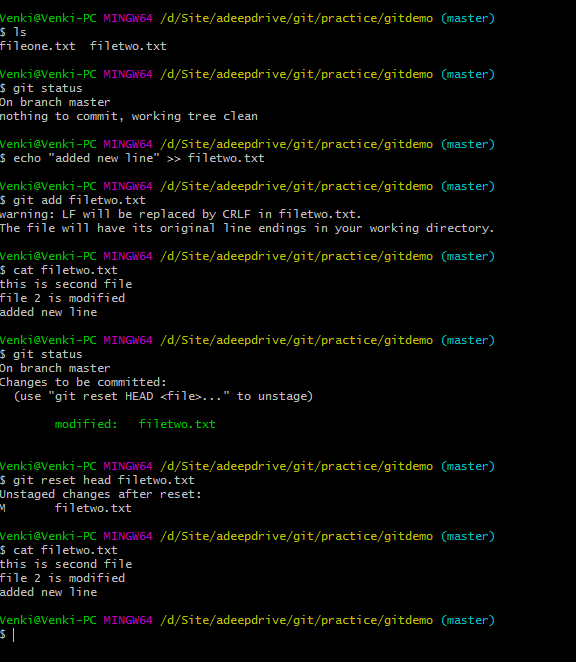
2) git reset Head <file-name>

These commands are very useful when we add the files to git. But later or before commit, we realize that mistakenly added the files to git. we should remove the files from git. The process of removing a file from  staging area is called "Unstaging file" from git.

We will be discussing indepth in this tutorial.


Unstage a File in Git

Way 1) git rm --cached <file-name>:

This can be used in two ways.

1) On the brand new file which is not on github.
2) On existing file which exists on github.

We will see how this command behaves on above 2 scenarios.

Case 1: rm --cached on new file which is not committed.

rm --cached <brand-new-file-name>is useful when we want to remove only the file(s) from staging area where this file is not available on github ever. After executing this command, the file remains in the local machine, it just unstaged from staging area.

Example:

The below example is on the new file.

Venki@Venki-PC MINGW64 /d/Site/adeepdrive/git/practice/gitdemo (master)
$ ls 
fileone.txt

Venki@Venki-PC MINGW64 /d/Site/adeepdrive/git/practice/gitdemo (master)
$ echo "this is second file" >> filetwo.txt
Venki@Venki-PC MINGW64 /d/Site/adeepdrive/git/practice/gitdemo (master)
$ ls
fileone.txt  filetwo.txt

Venki@Venki-PC MINGW64 /d/Site/adeepdrive/git/practice/gitdemo (master)
$ git add filetwo.txt

Venki@Venki-PC MINGW64 /d/Site/adeepdrive/git/practice/gitdemo (master)
$ git status
On branch master
Changes to be committed:
  (use "git reset HEAD <file>..." to unstage)
        new file:   filetwo.txt

Venki@Venki-PC MINGW64 /d/Site/adeepdrive/git/practice/gitdemo (master)

$ git rm --cached filetwo.txt
rm 'filetwo.txt'Venki@Venki-PC MINGW64 /d/Site/adeepdrive/git/practice/gitdemo (master)
$ git status
On branch master
Untracked files:
  (use "git add <file>..." to include in what will be committed)
        filetwo.txt
nothing added to commit but untracked files present (use "git add" to track)

Java 21 Virtual Threads Basic and Foundation

Introduction

Hey everyone 👋,

Welcome to the first post in our deep dive series on Java Virtual Threads! Before we jump into the nuts and bolts of virtual threads, it’s important to lay the foundation. Yes, the first couple of sections may feel basic—but they are essential to understand how things work under the hood, especially when we eventually zoom in on virtual threads.

So bear with me. This foundational knowledge will help you fully grasp the power and potential of virtual threads.

🚀 Starting Simple: Running a Java Program

Let’s imagine you’ve developed a simple Java application and packaged it into a JAR file.

 java -jar myapp.jar


When you run this command, your program is loaded into memory and a process is created.

Sunday, July 20, 2025

Java 8 - How to convert Calendar to LocalDateTime?

1. Overview

In this article, You'll learn how to convert Calendar to LocalDateTime object in java 8 DateTime api. 

LocalDateTime api can be used completely replacement to the Date class as all features of Date functions are done in a simple and precise way such as adding minutes to the current date.

Java 8 - How to convert Calendar to LocalDateTime?

Ultimate Guide to Java Virtual Threads: Build Scalable Applications with Ease

Are Java Virtual Threads the Future of Concurrency? Absolutely. Here's Why You Should Care.

If you're a Java developer, you already know: every line of code runs on a thread. Threads are the fundamental unit of scheduling and concurrency in any Java application.

Traditionally, developers have relied on multiple OS-level threads to handle concurrent tasks. For example, Spring Boot with embedded Tomcat comes configured with 200 threads by default, allowing it to process up to 200 concurrent requests. Sounds powerful, right?

But here’s the catch...

🧠 Why Traditional Threads Limit Scalability

Each request in a Java web application is processed by a dedicated OS thread. If each request takes 1 second, a 200-thread system can handle 200 requests per second — that’s your application throughput.

So, why not just add more threads?

Because OS threads are heavyweight:

Each thread consumes significant memory.

The OS has limits on how many threads can be created.

Managing thousands of threads leads to context switching overhead, degrading performance.

That’s where Java Virtual Threads come into play — a game-changing concurrency model introduced in Project Loom.

Saturday, July 19, 2025

Mastering @JsonFormat in Jackson: A Complete Guide with Examples

If you're working with Java and JSON, the Jackson library is likely part of your tech stack. One of the most powerful yet underused annotations it provides is @JsonFormat.

In this ultimate guide, we’ll break down what @JsonFormat does, when to use it, and how to handle advanced scenarios with fully working examples. This post is optimized for SEO to help developers find quick and accurate answers.


✅ What is @JsonFormat in Jackson?

@JsonFormat is a Jackson annotation that helps control how Java fields are serialized (Java to JSON) or deserialized (JSON to Java). This is especially useful for dates, enums, and number formats.

Import Statement:


import com.fasterxml.jackson.annotation.JsonFormat;

Dependencies

Make sure you include the correct Jackson modules for java.time:


 <dependency>
   <groupId>com.fasterxml.jackson.datatype</groupId>
   <artifactId>jackson-datatype-jsr310</artifactId>
   <version>2.15.3</version>
 </dependency>
 

And register it:


 ObjectMapper mapper = new ObjectMapper();
 mapper.registerModule(new JavaTimeModule());
 

Thursday, September 5, 2024

Java Program To Reverse A String Without Using String Inbuilt Function reverse()

1. Introduction


In this tutorial, You'll learn how to write a java program to reverse a string without using string inbuilt function reverse().
This is a very common interview question that can be asked in many forms as below.

A) java program to reverse a string without using string inbuilt function
B) java program to reverse a string using recursion
C) java program to reverse a string without using the reverse method
C) Try using other classes of Java API (Except String).


The interviewer's main intention is not to use the String class reverse() method.

Anonymous Comparator In Java For Sorting

1. Overview

In this tutorial, We'll learn how to sort arrays or lists using an anonymous comparator in java.

A complete guide on how to use comparator in java?

Anonymous class means creating the class and providing the implementation at the same without a class name.

For example, we have an interface Job and it has the method post() to post the new job. here, a new job1 instance is created for the implementation class of Job interface without a class name.

Example 1

interface Job {
	void post();
}

Job job1 = new Job() {

	@Override
	public void post() {
		System.out.println("Posting job 1 now");

}


This is similar to the anonymous implementation of the abstract class or interface. This is the actual implementation of the Comparator without creating a class and implementing the Comparator interface.

Sunday, September 1, 2024

Java Thread.join() Examples to Wait for Another Thread

1. Introduction


In this tutorial, We'll learn how to use Thread.join() method in java. And also how to join the multiple threads at one place after completing the execution of all threads or one thread or any other threads.

join() method is part of the Thread class and it is part of the java.lang package. All the classes in java.lang package is not needed to add import statements. So, directly you can use it in the programs. join() is mainly used to sleep or wait the current thread until completion of another thread execution.

Similar to the wait() and notify(), join() also widely used in the thread intercommunication.

2. Thread.join() Syntax


below is the syntax from Thread API. join() method is an overloaded method so we should be careful which method should be used.

public final void join() throws InterruptedException

public final void join(long millis) throws InterruptedException

public final void join(long millis, int nanos) throws InterruptedException


Java 8 String API also has join() method.

Friday, January 7, 2022

Java Program To Find First Non-Repeated Character In String (5 ways)

1. Overview


In this article, We will be learning and understanding the various ways to find the first non repeated character in a given string in various ways along with Java 8 Streams. Many programs may face this type of question in programming interviews or face to face round.
Let us start with the simple approach and next discover the partial and single iteration through the string.

Java Program To Find First Non-Repeated Character In String (5 ways)


Thursday, January 6, 2022

Latest 20+ JMS Interview Questions and Answers

1. Introduction


In this tutorial, We'll learn about JMS interview questions that are frequently asked in 2020. As part of the interview, There are chances to ask some of the questions on JMS area if you have 6 years plus. But, even less experience, it is good to have in the profile on JMS experience. The interviewer will check as messaging is a key aspect of enterprise Java development.
JMS is a popular open-source Messaging API and many vendors such as Apache Active MQ, Websphere MQ, Sonic MQ provides an implementation of Java messaging API or JMS.


Usually, Any interview starts with a basic. If all questions are answered properly then we will go onto the JMS experience project-based questions.

Basics mean What is Topic? What is the Queue? What is Publisher? What is Subscriber? What are a Publisher and Subscriber model? How to configure MQ?
Next level means Questions on a project where you have implemented JMS concepts?

Java String startsWith() Examples

1. Overview

In this article, You'll learn how to Test if this string starts with the specified prefix. 

Method startsWith() is case-sensitive.

String API is added with a method startsWith() that returns true if the character sequence represented by the argument is a prefix of the character sequence represented by this string; false otherwise. Note also that true will be returned if the argument is an empty string or is equal to this String object as determined by the equals(Object) method.

This method works exactly opposite to the String endsWith() method.

Java String startsWith() Examples

Friday, December 31, 2021

Java 8 Default and Static Methods - Interface New Concepts

1. Overview


In this Java 8 new concept, We are going to learn today what is the Default Method in Java 8 and why it is introduced in java 8 changes.

Java 8 introduces a new concept of default method implementation in interfaces. This capability is added for backward compatibility so that old interfaces can be used to leverage the lambda expression capability of Java 8. For example, the List interface is not having the forEach() method. If they add this method as an abstract method then all List implementation classes must have to provide the implementation since it is common functionality to iterate the list. So they had to introduce this concept to enhance features and support for the backward classes.

Java 8 Default and Static Methods

Java 8 Nashorn Javascript With Examples

1. Overview

In this tutorial, you will learn how to use javascript in java and how to integrate them with each other.

Usage of javascript in java can be done with the newly added Nashorn JavaScript engine in java 8.

This completely replaces the old version of the Rhino javascript engine and it gives 2 to 10 times better performance than the older one because it does the code compilation in memory and passes the byte code to the JVM directly.

And also it uses the dynamic loading feature is introduced in java 7 to enhance the performance and completely replaces the Rhino Engine.

Java 8 Nashorn Javascript


Let us start writing the examples using the code from the command line, java, and javascript code.

Note: Before using jjs tool,  you should remember that "The jjs tool is planned to be removed from a future JDK release"

2. Nashorn jjs - Command-Line Engine

JDK 1.8 is equipped with the command line interpreter that is called "jjs". jjs is used to run the javascript files as below.

jjs tool can be found at the location $JAVA_HOME/bin

jjs> jjs first_script.js

And also jjs can be used as interactive shells such as REPL. To start a REPL, do not pass any arguments to it.

javprogramto-MacBook-Pro-2$ jjs
Warning: The jjs tool is planned to be removed from a future JDK release
jjs> 
jjs> 

You can print the content on to console using print() method and it takes string content.

jjs> print("Hello World")
Hello World
jjs> print("welocome to javaprogramto.com blog for java 8 tutorial")
welocome to javaprogramto.com blog for java 8 tutorial
jjs> 

3. Running js file as a shell script

As you run the shell script file from the command line like "./hello.sh" in a similar way you can run the javascript file. 

Just add bang pointing to jjs location "#!$JAVA_HOME/bin/jjs"

Let us write a simple code and save it as hello.js file.

#!$JAVA_HOME/bin/jjs
var greeting = "Hello World, Welcome";
print(greeting);

Now, run this script from the command line with "./hello.js" and observe the below output.

$ ./hello.js
Warning: The jjs tool is planned to be removed from a future JDK release
Hello World, Welcome
$ 

Like this, you can use java code from the js file also. In the next, sections you will understand how to use java code in javascript files.

4. Passing Arguments to JJS

jjs command can work with the arguments also. When you use jjs command to start the interactive mode, you can pass as many as arguments you need.

And all of the passed arguments are stored in a variable "arguments". By using this builtin keyword in javascript, you can get all of these argument values.

Note: You need to pass the double hyphen "--" after jjs command.

Let us run the sample code as "jjs -- one two threee"

Arguments Example:

$ jjs -- one two threee
Warning: The jjs tool is planned to be removed from a future JDK release
jjs> print("given  argument  values are "+arguments.join(" , "))
given  argument  values are one , two , threee
jjs>$ 

5. Call JavaScript from Java

Java 8 api is added with a built-in engine that is called an Embedded Script Engine which creates a runtime environment to execute the javascript code on the JVM for a dynamic language.

Use ScriptEngineManager class to get the script engines that are managed by JVM.

Next, get the nashorn script engine using getEngineByName("nashorn") and pass the right name to it.

Finally, call eval() method to run the native javascript code from java and eval() returns an Object if you are executing arithmetic operations. In such cases, you need to use explicit type casting to the right object types. It is the time now to play with the javascript notations.

package com.javaprogramto.java8.nashorn;

import javax.script.ScriptEngine;
import javax.script.ScriptEngineManager;
import javax.script.ScriptException;

public class CallJavaScriptFromJavaExample {

    public static void main(String[] args) throws ScriptException {

        // creating java script engine
        ScriptEngineManager scriptEngineManager = new ScriptEngineManager();

        // getting the nashorn engine
        ScriptEngine nashorn = scriptEngineManager.getEngineByName("nashorn");

        // evaluating the javascript statement  to  print
        nashorn.eval("print('hello , this is first javascript example in java') ");

        // summing 2  numbers in  js  from  java code.
        Integer i = (Integer) nashorn.eval("1 + 2");
        
        System.out.println("sum from javascript : " + i);
    }
}
 

Output:

hello , this is first javascript example in java
sum from javascript : 3
 

You can observe the output that printed the content using the javascript print() method and the addition of two numbers.

6. Exceptions  from NashornScriptEngine

If you pass the invalid or wrong javascript syntax to eval() method then. it will throw a runtime exception saying "ScriptException" with different reasons.

If you miss the ending or closing quotes. for the print() method then it. will say "<eval> Missing close quote"

 Warning: Nashorn engine is planned to be removed from a future JDK release
 Exception in thread "main" javax.script.ScriptException: <eval>:1:57 Missing close quote
 pirnt('hello , this is first javascript example in java) 
                                                          ^ in <eval> at line number 1 at column number 57
 	at jdk.scripting.nashorn/jdk.nashorn.api.scripting.NashornScriptEngine.throwAsScriptException(NashornScriptEngine.java:477)
 	at jdk.scripting.nashorn/jdk.nashorn.api.scripting.NashornScriptEngine.compileImpl(NashornScriptEngine.java:544)
 	at jdk.scripting.nashorn/jdk.nashorn.api.scripting.NashornScriptEngine.compileImpl(NashornScriptEngine.java:531)
 	at jdk.scripting.nashorn/jdk.nashorn.api.scripting.NashornScriptEngine.evalImpl(NashornScriptEngine.java:409)
 	at jdk.scripting.nashorn/jdk.nashorn.api.scripting.NashornScriptEngine.eval(NashornScriptEngine.java:162)
 	at java.scripting/javax.script.AbstractScriptEngine.eval(AbstractScriptEngine.java:264)
 	at com.javaprogramto.java8.nashorn.CallJavaScriptFromJavaExample.main(CallJavaScriptFromJavaExample.java:16)
 Caused by: jdk.nashorn.internal.runtime.ParserException: <eval>:1:57 Missing close quote
 pirnt('hello , this is first javascript example in java) 
                                                          ^
 	at jdk.scripting.nashorn/jdk.nashorn.internal.parser.Lexer.error(Lexer.java:1860)
 	at jdk.scripting.nashorn/jdk.nashorn.internal.parser.Lexer.scanString(Lexer.java:1006)
 	at jdk.scripting.nashorn/jdk.nashorn.internal.parser.Lexer.lexify(Lexer.java:1717)
 	at jdk.scripting.nashorn/jdk.nashorn.internal.parser.AbstractParser.getToken(AbstractParser.java:135)
 	at jdk.scripting.nashorn/jdk.nashorn.internal.parser.AbstractParser.nextToken(AbstractParser.java:216)
 	at jdk.scripting.nashorn/jdk.nashorn.internal.parser.AbstractParser.nextOrEOL(AbstractParser.java:173)
 	at jdk.scripting.nashorn/jdk.nashorn.internal.parser.AbstractParser.next(AbstractParser.java:160)
 	at jdk.scripting.nashorn/jdk.nashorn.internal.parser.Parser.scanFirstToken(Parser.java:293)
 	at jdk.scripting.nashorn/jdk.nashorn.internal.parser.Parser.parse(Parser.java:323)
 	at jdk.scripting.nashorn/jdk.nashorn.internal.parser.Parser.parse(Parser.java:285)
 	at jdk.scripting.nashorn/jdk.nashorn.internal.runtime.Context.compile(Context.java:1500)
 	at jdk.scripting.nashorn/jdk.nashorn.internal.runtime.Context.compileScript(Context.java:1467)
 	at jdk.scripting.nashorn/jdk.nashorn.internal.runtime.Context.compileScript(Context.java:750)
 	at jdk.scripting.nashorn/jdk.nashorn.api.scripting.NashornScriptEngine.compileImpl(NashornScriptEngine.java:542)
 	... 5 more
 

If you pass the invalid method name then it will give an error.

nashorn.eval("invoke(10, 20)");
 

Error:

Warning: Nashorn engine is planned to be removed from a future JDK release
Exception in thread "main" javax.script.ScriptException: ReferenceError: "invoke" is not defined in <eval> at line number 1
	at jdk.scripting.nashorn/jdk.nashorn.api.scripting.NashornScriptEngine.throwAsScriptException(NashornScriptEngine.java:477)
	at jdk.scripting.nashorn/jdk.nashorn.api.scripting.NashornScriptEngine.evalImpl(NashornScriptEngine.java:461)
	at jdk.scripting.nashorn/jdk.nashorn.api.scripting.NashornScriptEngine.evalImpl(NashornScriptEngine.java:413)
	at jdk.scripting.nashorn/jdk.nashorn.api.scripting.NashornScriptEngine.evalImpl(NashornScriptEngine.java:409)
	at jdk.scripting.nashorn/jdk.nashorn.api.scripting.NashornScriptEngine.eval(NashornScriptEngine.java:162)
	at java.scripting/javax.script.AbstractScriptEngine.eval(AbstractScriptEngine.java:264)
	at com.javaprogramto.java8.nashorn.CallJavaScriptFromJavaExample.main(CallJavaScriptFromJavaExample.java:18)
Caused by: <eval>:1 ReferenceError: "invoke" is not defined
	at jdk.scripting.nashorn/jdk.nashorn.internal.runtime.ECMAErrors.error(ECMAErrors.java:57)
	at jdk.scripting.nashorn/jdk.nashorn.internal.runtime.ECMAErrors.referenceError(ECMAErrors.java:319)
	at jdk.scripting.nashorn/jdk.nashorn.internal.runtime.ECMAErrors.referenceError(ECMAErrors.java:291)
	at jdk.scripting.nashorn/jdk.nashorn.internal.objects.Global.__noSuchProperty__(Global.java:1616)
	at jdk.scripting.nashorn.scripts/jdk.nashorn.internal.scripts.Script$Recompilation$1$\^eval\_/0x00000008001dc040.:program(<eval>:1)
	at jdk.scripting.nashorn/jdk.nashorn.internal.runtime.ScriptFunctionData.invoke(ScriptFunctionData.java:655)
	at jdk.scripting.nashorn/jdk.nashorn.internal.runtime.ScriptFunction.invoke(ScriptFunction.java:513)
	at jdk.scripting.nashorn/jdk.nashorn.internal.runtime.ScriptRuntime.apply(ScriptRuntime.java:527)
	at jdk.scripting.nashorn/jdk.nashorn.api.scripting.NashornScriptEngine.evalImpl(NashornScriptEngine.java:456)
	... 5 more
 

7. Call Java From JavaScript

In the previous section,  we. have seen how to call native javascript code from java classes. 

Next, let us see how to use java classes in JavaScript files.

Let us create a sample javascript code that uses the java class BigDecimal.

Call Java.type() method to use the java classes from javascript and pass the class name along with the package name. Then that class is loaded into the nashorn engine and returns its object. So, we've stored it in the var variable.

Calling Java Methods from JavaScript Example:

var BigDecimalClass = Java.type('java.math.BigDecimal');

function calculate(amount, percentage) {

    var result = new BigDecimalClass(amount).multiply(new BigDecimalClass(percentage)).divide(
        new BigDecimalClass("100"), 2, BigDecimalimalClass.ROUND_HALF_EVEN);

    return result.toPlainString();
}
var result = calculate(1000,20);
print("Final value : "+result);
 

Output:

$ jjs sample.js 
Final value : 200.00
$ 
 

Any java class can be used inside the javascript code such as adding key-value pairs. to HashMap.

Save the below file as hashmap.js

Example to use HashMap from Javascript:

var HashMap = Java.type('java.util.HashMap')
var map = new HashMap()
map.put('hello', 'world')
print("map values : "+map)
 

Output:

$ jjs hashmap.js 
map values : {hello=world}
$ 
 

8. Conclusion

In this article,  you've seen the new javascript engine nashorn added in java 8.

Examples on how to call javascript from java and vice versa.

Now, you can call javascript functions, pass bindings, and use java objects from both languages using jjs tool.

All examples shown are over GitHub.

Examples of Nashorn engine on GitHub

Removal of Nashorn

ScriptEngine API
Tuesday, December 28, 2021

How to compare two HashSet for equality in Java 8? (Fastest Way)

1. Overview


In this article, You'll learn how to compare two Sets in Java using Stream API.

Java HashSet class equals() method takes Object but when you are calling on a set object then you must pass the HashSet or Set implementation object.

Compares the specified object with this set for equality. Returns true if the specified object is also a set, the two sets have the same size, and every member of the specified set is contained in this set (or equivalently, every member of this set is contained in the specified set). This definition ensures that the equals method works properly across different implementations of the set interface.

Let us see the examples using equals(), containsAll() method of the Set interface. In the end, We'll explore how to compare two HashSet in java 8.

How to compare two HashSet for equality in Java 8? (Fastest Way)


Java UnknownHostException - Invalid Hostname for Server - How to Fix It?

1. Introduction

In this tutorial, We'll learn what is UnknownHostException and What is the cause to produce it. And also learn how to prevent it.  UnknownHostException is a common exception and will show the best ways to prevent this exception.

Hierarchy:

java.lang.Object
java.lang.Throwable
java.lang.Exception
java.io.IOException
java.rmi.RemoteException
java.rmi.UnknownHostException


2. When is the Exception Thrown?


UnknownHostException is thrown if and if only there was a problem with a domain name or mistake in typing. And also indicates that the IP Address of a website could not be determined.

Java Program to Check Leap Year (With Examples)

1. Overview

In this tutorial, you'll learn how to check the given year is a leap year or not.

Everyone knows that leap year comes for every 4 years and February month with 29 days.

But, when we do the logic in java it is bit different and should know the complete formula to evaluate leap year.


Java Program to Check Whether an Alphabet is Vowel or Consonant

1. Overview

In this tutorial, you'll learn how to check the given alphabet is a vowel or consonant in java.

We are going to solve this question using if else and switch statements.

To understand the programs in this article, you should have knowledge on the following topics.


Wednesday, December 22, 2021

Java Program to Calculate Standard Deviation

1. Overview

In this tutorial, you'll learn how to calculate the standard deviation in java using for loop and its formula.


2. Example to calculate standard deviation

Let us write a simple java program to find the standard deviation for an individual series of numbers.

First create a method with name calculateStandardDeviation(). Create an array with integer values and. pass this array to the calculateStandardDeviation() method. This method has the core logic to get the standard deviation and. returns to main method.

package com.javaprogramto.programs.arrays.calculation;

public class StandardDeviation {

	public static void main(String[] args) {

		int[] array = { 1, 2, 3, 4, 5, 6, 7, 8, 9 };

		double standardDeviation = calculateStandardDeviation(array);

		System.out.format("Standard deviation : %.6f", standardDeviation);

	}

	private static double calculateStandardDeviation(int[] array) {

		// finding the sum of array values
		double sum = 0.0;

		for (int i = 0; i < array.length; i++) {
			sum += array[i];
		}

		// getting the mean of array.
		double mean = sum / array.length;

		// calculating the standard deviation
		double standardDeviation = 0.0;
		for (int i = 0; i < array.length; i++) {
			standardDeviation += Math.pow(array[i] - mean, 2);

		}

		return Math.sqrt(standardDeviation/array.length);
	}

}
 

Output:

Standard deviation : 2.581989
 

3.  Conclusion

In this article, you've seen how to find the standard deviation in java.

As usual, the shown example is over GitHub.


4 Solutions To Uncaught ReferenceError: $ is not defined jQuery Error

1. Overview


In this tutorial, We will be discussing how to solve the famous jQuery error "Uncaught ReferenceError: $ is not defined jQuery Error" that occurs for every developer who started working on jQuery API.

More on JQuery

This error comes into existence if you are trying to use a $ variable that is not defined yet using the var keyword. In jQuery world, it's a short name of jQuery() function and most commonly used in $(document).ready(function()). When dom is loaded, you are making some stuff using jQuery then there might be chances of corrupting the jQuery library or jQuery file location. This indicates with an error saying "uncaught reference error $ is not defined". This is the most generic error even if you are working on Angular Js, Ajax, Html, and MVC, laravel or rails .. any framework that is related to javascript. Because all of these are built on top of JavaScript.

In my experience, I have seen the junior developers or whose background is java, .Net, C#, Android technologies, and these developers is not having enough knowledge of JavaScript. JavaScript understanding is a must to work on jQuery or any JavaScript framework such as Angular, React or vue.js or ember.js. Once you know the basic concepts of JavaScript, you can troubleshoot any problems easily.